OpenRouter Model Providers

When you request a model through OpenRouter, your request is routed to one of many infrastructure providers that host the same model. Every provider runs identical model weights, but they differ in performance, reliability, pricing, context limits, and hardware.
Most users can simply leave provider selection on Automatic, but advanced users may want to control exactly which providers are used.
Why Do Some Providers Produce Better Results?
Although providers serve the same model, response quality can vary a lot, due to differences in their inference setup.
Common reasons include:
- Quantization – Some providers run FP8 or other optimized formats instead of BF16, which may slightly reduce quality in complex tasks.
- Sampling – Providers may use different default generation settings or support different parameters.
- Model Revision – Providers may not all be running the exact same model version immediately after updates.
- Chat Templates – Differences in prompt formatting or hidden system prompts can significantly affect output quality.
- Inference Engine – Different serving software (vLLM, TensorRT-LLM, SGLang, etc.) can produce slightly different results.
- Safety Layers – Some providers apply additional moderation or output filtering.
- Performance Optimizations – Techniques like speculative decoding or aggressive batching can occasionally impact generation quality.
Recommendation
If you find a provider that is consistently slow and/or produces poor/badly formatted responses for its task, add it to your Excluded Providers list for more consistent results.
As of Beta 22 these are recommended excluded providers, for the suggested LLMs. For reasons like faulty outputs, very high latency, constant timeouts, extreme pricing diferences and provider-side censoring.
They currently still come non-excluded by default, due to possible latency fluctuations by region and the fact the user may be using different LLMs, where these providers may output better.
To Exclude providers through the OpenRouter web page go to Preferences ---> Privacy
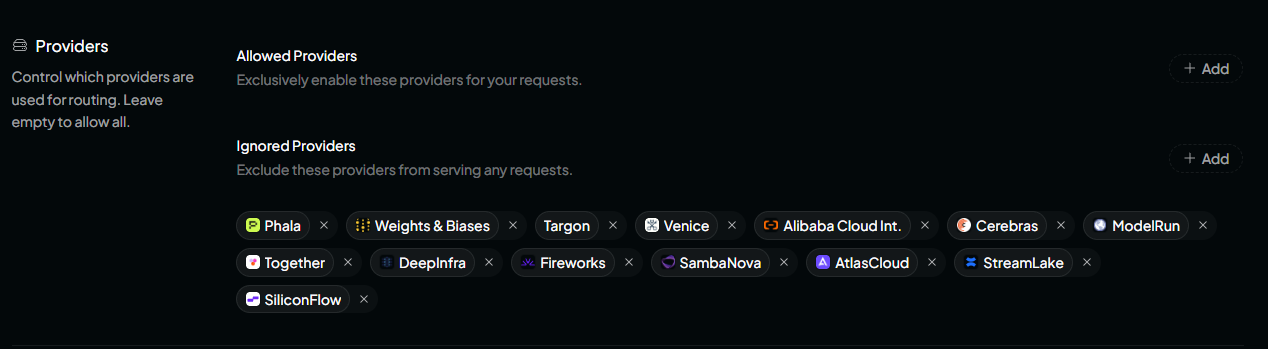
Reasons for Exclusion
High Pricing "Cerebras", "SambaNova",
Latency/Timeouts "Phala", "Weights & Biases", "Venice", "ModelRun", "Together",
"Fireworks", "SiliconFlow"
Faulty outputs
"AtlasCloud", "StreamLake", "DeepInfra", "Targon",
Content censoring
"Alibaba Cloud International",
How Provider Routing Works
When no provider restrictions are configured:
- OpenRouter automatically chooses a provider.
- The routing mode (Balanced, Nitro, Exact, etc.) determines which provider is selected.
- If one provider is unavailable, OpenRouter automatically fails over to another.
This provides the highest reliability.
Provider Metrics
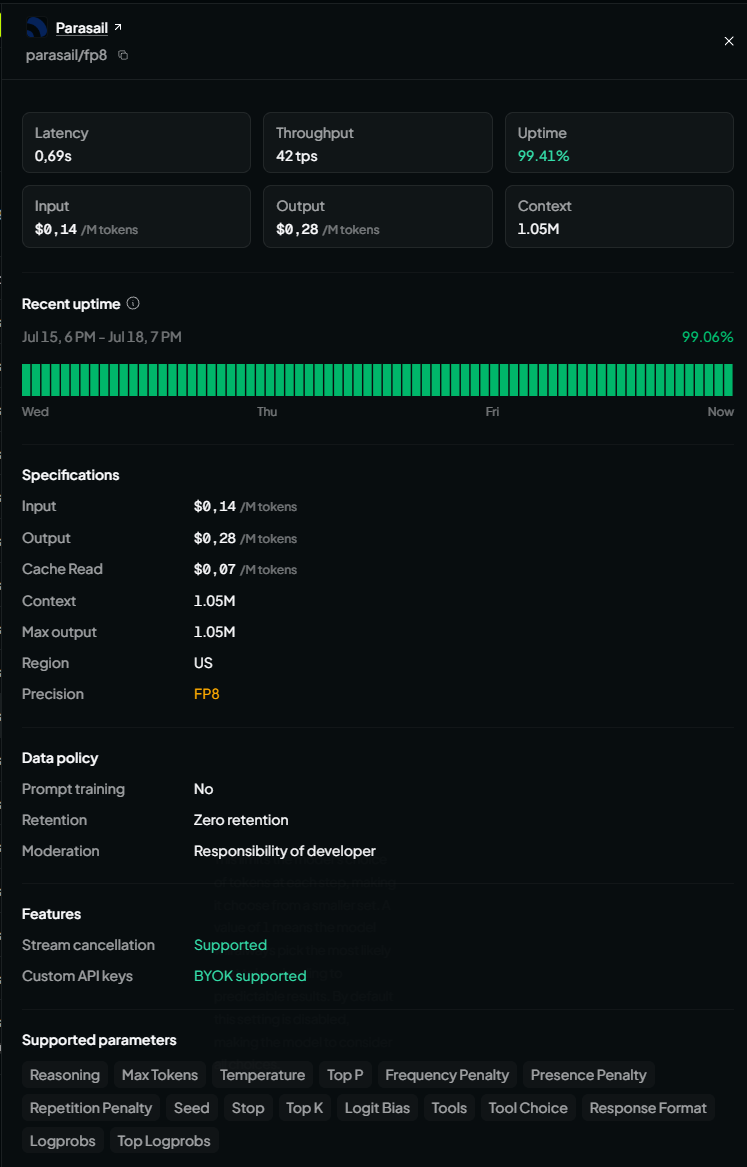
Each provider displays several important statistics.
Input Price
Cost per million input tokens.
Example:
$0.10 / 1M input tokens
This is the most important price, since the vast majority of tokens will be in the inputs.
Output Price
Cost per million generated tokens.
Example:
$0.35 / 1M output tokens
This cost, while it should be ideally low, matters less, since the outputs ( like dialogue responses) will be tipically low ( a few short sentences, barring tasks, like bios, memories and diary generation)
Cache Read
Price for cached prompt tokens.
When prompt caching is enabled, reused prompt sections are significantly cheaper than sending them again.
However due to Skyrimnet very dynamic context, cache savings are not substantial (an architectural tradeoff, a static context is much easier to cache than one that reflects the surroundings in real time)
Latency
Average delay before the model starts responding.
Lower is better.
Example:
| Latency | Experience |
|---|---|
| 0.3 s | Extremely responsive |
| 0.6 s | Very fast |
| 1.5 s | Noticeable delay |
| 3+ s | Slow |
Throughput
Generation speed after the first token.
Measured in:
tokens / second (tps)
Higher throughput means faster responses.
Example:
| Throughput | Speed |
|---|---|
| 10 tps | Slow |
| 25 tps | Average |
| 50 tps | Fast |
| 100+ tps | Extremely fast |
Uptime
Percentage of successful requests over recent history.
Example:
99.95%
Higher uptime means fewer failures and less downtime.
Provider Details
Opening a provider shows additional information.
Typical information includes:
- Average latency
- Average throughput
- Uptime history
- Pricing
- Maximum context length
- Region
- Precision (FP8, BF16, etc.)
- Data policy
- Supported parameters
Context Length
Some providers expose larger context windows than the model's default.
Example:
| Provider | Context |
|---|---|
| Standard | 262K |
| Parasail FP8 | 1.05M |
A larger context allows significantly longer conversations or documents.
Skyrimnet uses an architecture of multiple fast, short calls, so ontext sizes should not be a limiting factor, since they are relatively small ( typically around 5-20k input and less than 1k output)
Precision
Providers may run different numerical precisions.
Examples:
- BF16
- FP16
- FP8
Lower precision generally:
- reduces hardware cost
- increases speed
- usually has little or no noticeable effect on output quality
FP8 is becoming increasingly common for serving large language models.
Region
Some providers specify the hosting region.
Example:
US
Europe
Asia
This may slightly affect latency depending on your location.
Data Policy
Providers disclose how requests are handled.
Typical fields include:
Prompt Training
Whether prompts are used for model training.
Example:
No
Retention
Whether requests are stored.
Example:
Zero retention
Zero retention means prompts are discarded after processing.
Moderation
Indicates who is responsible for content moderation.
Example:
Responsibility of developer
Supported Parameters
Providers may expose different API features.
Common supported parameters include:
- Temperature
- Top P
- Top K
- Max Tokens
- Seed
- Stop Sequences
- Frequency Penalty
- Presence Penalty
- Repetition Penalty
- Logit Bias
- Logprobs
- Tool Calling
- Tool Choice
- Response Format
- Reasoning
If a provider does not support a parameter, OpenRouter may ignore it or route the request elsewhere.
Choosing Providers
OpenRouter lets you manually control which providers may serve your requests.
Navigate to:
Model Settings
→ Providers
You have two configuration options.
Allowed Providers
Only the selected providers are eligible.
Example:
Allowed Providers

✓ OpenInference
✓ Parasail
✓ Novita
OpenRouter will only use these providers.
If none are available, the request will fail.
Ignored Providers
Blacklist providers you do not want to use.
Example:
Ignored Providers

✗ Together
✗ Fireworks
✗ Cerebras
OpenRouter will use every other provider.
This is the recommended option if you only want to avoid a few providers while keeping automatic failover.
When Should You Restrict Providers?
Most users should leave provider selection unrestricted.
Restrict providers only when you need:
- lower costs
- faster responses
- larger context windows
- specific data policies
- better uptime
- consistent performance
- testing a particular provider
Tips
- Lowest cost: Sort providers by input/output price.
- Fastest responses: Look for low latency and high throughput.
- Maximum reliability: Choose providers with uptime above 99.9%.
- Best privacy: Prefer providers offering zero retention and no prompt training.
- Best compatibility: Leave provider selection automatic unless you have a specific reason to restrict it.